
Startups don’t always have the luxury of time or budget, especially in the early days. That’s why at Gera-IT, we decimal costs and no heavy development involved? To find out, we tested Replit’s AI Agent - a tool that promises to turn plain-language prompts into live websites. What we discovered was a surprisingly efficient and budget-friendly way to go live fast, that is why we think it’s worth sharing.

Understanding Replit's AI Agent
Replit's AI Agent is an innovative tool that enables users to build applications by simply describing their desired outcome in natural language. This AI-powered assistant can:
- Generate full-stack applications from scratch.
- Add advanced features and integrate complex APIs.
- Design and modify database structures.
- Streamline environment setup and dependency management.
This functionality is particularly beneficial for teams without extensive coding expertise, allowing for rapid prototyping and deployment.
Step-by-Step Building a Landing Page with Replit's AI Agent
1. Initiate the Project
We began by accessing Replit for free and selecting the option to create a new app using the AI Agent. The interface prompted us to describe our project in everyday language.
We imagined that we were working on a Project X, that we would like to promote as a platform for task management in the format of checklists.
Our Prompt:
I need a modern, responsive, and mobile-friendly landing page for a SaaS product named Project X. The tool is designed for teams to collaboratively create, manage, and assign shared to-do lists, with features like real-time updates, task ownership, and simple team management.
Please follow these layout and design instructions:
🔹 General Requirements
- The landing page must be visually clean, user-friendly, and optimized for desktop, tablet, and mobile.
- Use light, minimalistic design with white or light grey backgrounds, and accent colors in blue and green tones.
- Include scrolling animations or section transitions if easy to implement.
- Prioritize performance and fast load time.
- Use only open-source web fonts (e.g., Inter, Roboto, or similar modern sans-serif fonts).
🔹 Page Structure
1. Header
- Project X logo (placeholder).
- Navigation menu: “Features”, “How it Works”, “Pricing”, “Testimonials”, “Try for Free”.
- Sticky on scroll, collapses into a hamburger menu on mobile.
2. Hero Section
- Bold headline introducing Project X as “Team To-Dos, Made Simple.”
- Subtext: “Create shared task lists, assign responsibilities, and collaborate in real-time — all in one place.”
- Prominent CTA button: “Try for Free” (scrolls to signup form or pricing).
- Optional illustration or background image that reflects teamwork/productivity.
3. Features Section
- 3 to 4 key features, each with:
- An icon (use placeholders).
- Feature title.
- 1–2 sentence descriptions.
- Examples:
- Shared To-Do Lists with Real-Time Sync
- Task Assignment and Team Roles
- Mobile-First Design
- Easy Onboarding and Task Tracking
4. How It Works Section
- Visual or 3-step horizontal layout:
- Step 1: “Create a list for your team”
- Step 2: “Add and assign tasks”
- Step 3: “Track progress together”
- Add small icons or illustrations for each step.
5. Pricing Section
- Three-column layout: Free, Pro, and Team plans.
- Use placeholder values and features.
- “Pro” plan should be visually highlighted as recommended.
- CTA buttons under each plan.
6. Testimonials Section
- Carousel or grid layout.
- 2–3 fake quotes from users with placeholder names and avatars.
- Example quote: “We moved our team planning to Project X and never looked back.”
7. Call to Action Section
- Reinforce key value: “Ready to simplify your team’s tasks?”
- CTA button: “Get Started Free”
8. Footer
- Links to: About, Contact, Terms, Privacy Policy.
- Social media icons (LinkedIn, Twitter, GitHub) — use placeholders.
- Company name and copyright.
🔹 Technical Notes
- Use HTML, CSS, and vanilla JS, or optionally React if component structure is preferred.
- Make sure the layout is fully responsive.
- Dummy text and image placeholders are fine — we will replace them later.
- No backend logic is needed at this stage — this is just a landing page.
This description was the only specification needed for the AI Agent to start its work on the landing page.
2. Review and Approve the Build Plan
The AI Agent generated a comprehensive plan outlining the structure and components of the landing page. We reviewed the proposed layout and approved it to proceed with the build.
3. Customize and Refine
Here is what we’ve got from the first attempt:
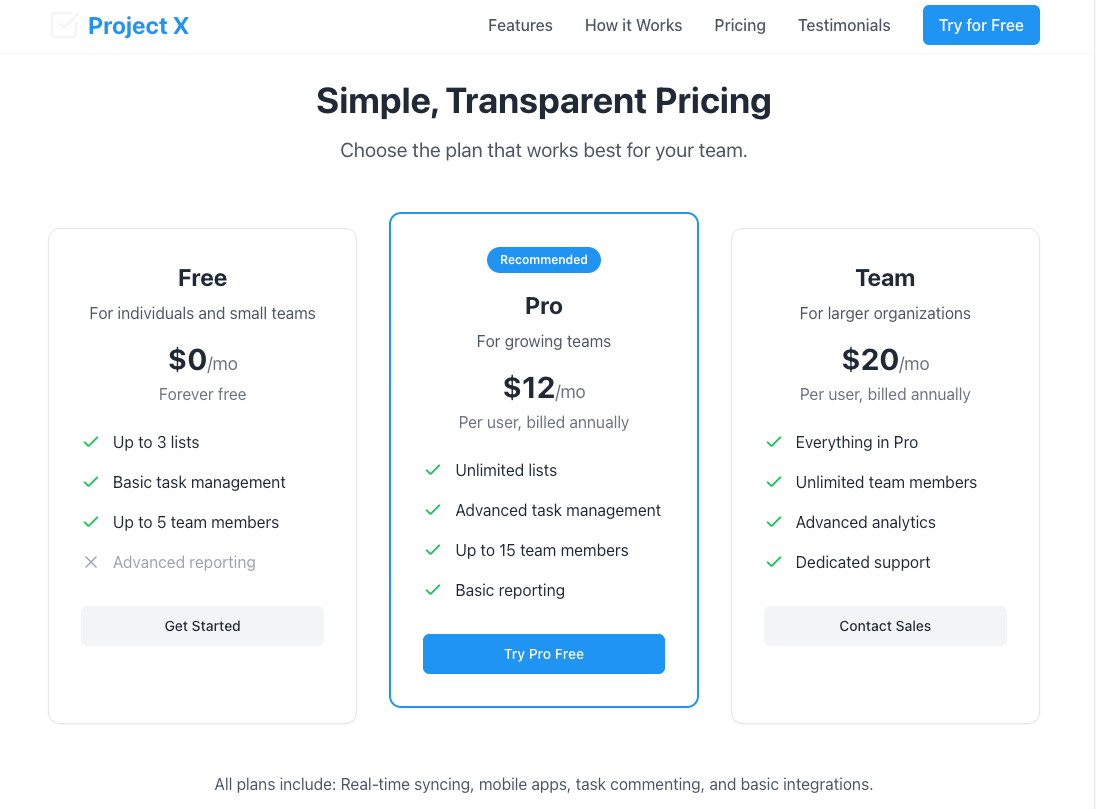
Post-initial setup, we engaged in an interactive session with the AI Agent to fine-tune the landing page. For example:
- Add pages for Privacy Policy and Terms of Service with the dummy text
- Change the primary button color to turquoise.
This iterative process allowed us to make real-time adjustments, ensuring the final product aligned with our vision.
Examples of cooperation:
4. The Next Step
Replit offers a built-in “Deploy to production” feature that allows you to publish a stable, live version of your app. There are several deployment options available depending on your needs, but for simple HTML websites, the "Static pages" option is ideal. It supports HTML, CSS, and JavaScript without requiring any backend server or database.
With this option, you can deploy a website that:
- Is accessible via a public URL
- Does not require backend logic or data storage
- Only incurs charges for outbound data over the included plan limits
To use the deployment feature, you’ll need to upgrade your plan. Replit also supports integration with custom domains, which is available through its paid plans. This makes it a fast and affordable solution for teams looking to go live quickly with a frontend-only website.
While Replit is great for building and testing ideas quickly, it's also flexible enough to let you continue the journey elsewhere. Once your team is happy with the result, the entire project can be exported and used outside of the Replit platform.
This means you are not locked in: you can take the code, run it locally on your own computer, or move it to any other hosting service your team prefers. Whether you are handing it off to developers, integrating it into a larger system, or preparing it for a more advanced deployment, Replit gives you the freedom to grow beyond the prototype.
The process is straightforward: download the project, set it up in your own environment, and continue building from there. It’s a practical path for startups who want to validate ideas quickly, without losing the ability to scale when they’re ready.
Privacy and Security Considerations
While Replit offers a powerful platform for rapid development, it is key to understand its privacy and security protocols:
- Public vs. Private Repls:
- Public Repls: By default, in the free version, projects are public and licensed under the MIT License, allowing others to view and use the code. Additionally, public Repls may be used by Replit to improve its services, including AI model training.
- Private Repls: Available under paid plans, private Repls are not publicly accessible and are excluded from Replit's AI training datasets. This is essential for projects involving sensitive or proprietary information.
- Data Protection Compliance:
- Replit adheres to major data protection regulations, including GDPR and CCPA, ensuring user data is handled responsibly.
- Security Measures:
- Replit maintains a comprehensive security program designed to protect user data against unauthorized access or disclosure.
For teams handling confidential data, we recommend utilizing Replit's private Repl feature and reviewing their Privacy Policy and Terms of Service for detailed information.
Summary
Replit's AI Agent has proven to be a valuable tool for rapid development and deployment of web applications. Its intuitive interface and powerful AI capabilities enable teams to bring ideas to life swiftly, making it an excellent choice for startups and projects requiring quick turnaround times.
At Gera-IT, we recognize the potential of such tools in streamlining development processes and will continue to explore and integrate innovative solutions to better serve our clients. Our team is always happy to help you create secure and reliable products according to ISO-9001 and ISO-27001 standards.
Tags: AI, create website