
Launching a new project can feel overwhelming as there are so many moving pieces, from shaping an idea to turning it into a working prototype.
Fortunately, modern AI tools have become powerful allies in the early stages of software development — helping reduce costs, accelerate execution, and inspire new approaches to problem-solving.
Today, it’s far easier for startups and businesses to validate software ideas quickly. What used to take 3–6 months can now be done in just 2–4 weeks — including a functional prototype.
But speed alone isn’t enough. To truly benefit from AI-driven development, it’s crucial to have an experienced team that understands both the technology and the product goals. Without the right expertise, AI can create more noise than results.
In this article, we’ll walk through the key phases of project initiation and show how AI can support each step — along with a curated list of the most useful tools to try at every stage.
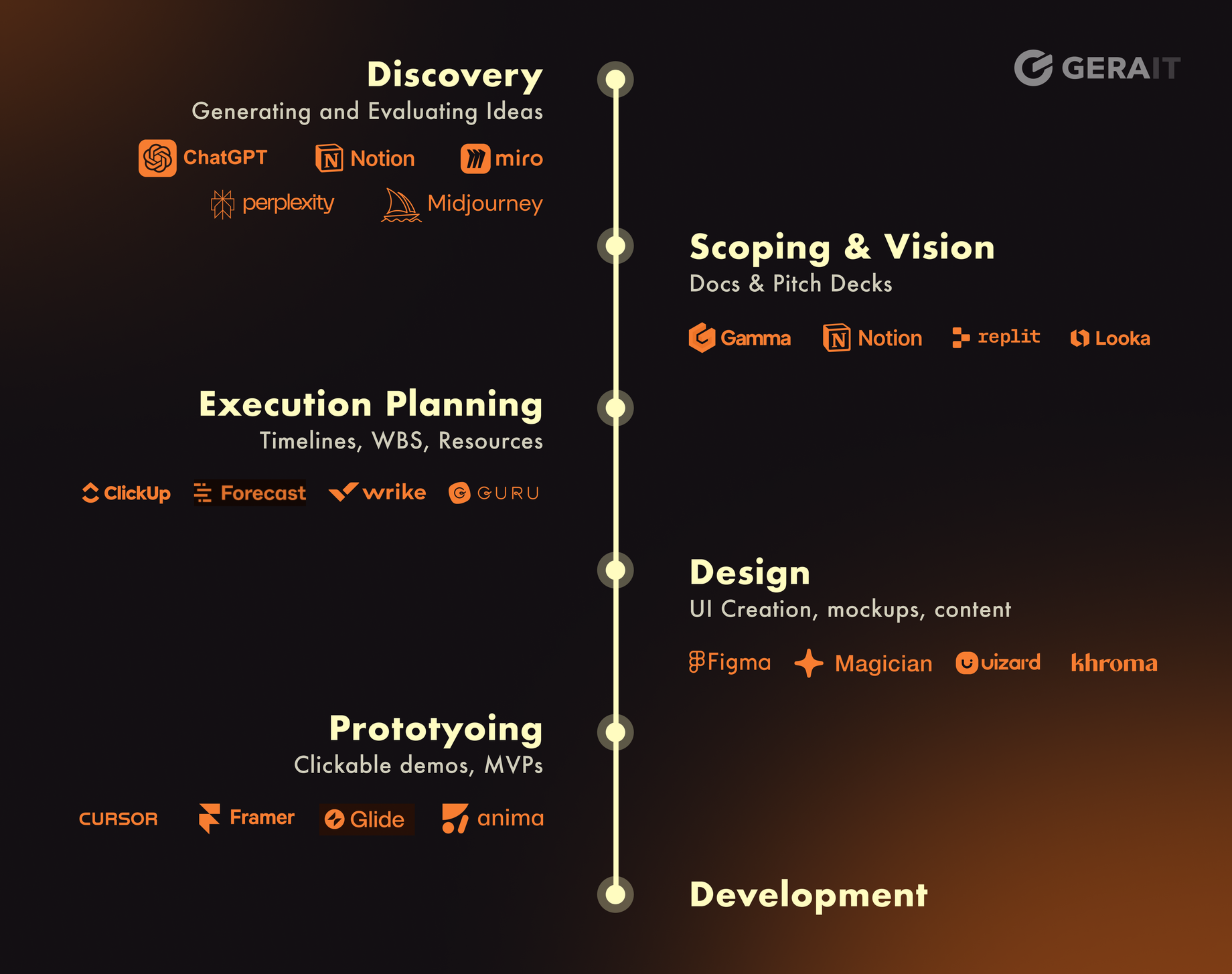
1. Discovery: Shaping the Problem and Idea
The discovery phase is about understanding the problem space, researching the market, and defining what should be built.
How AI helps:
- AIdeation means using AI to help generate and refine ideas. You describe a topic or goal, and the AI suggests directions, questions to ask, or possible product concepts.
- Prompt-to-document tools allow you to generate a Product Requirements Document (PRD), user personas, or lists of hypotheses.
Go-To AI Tools: |
2. Scoping & Vision: From Idea to Actionable Plan
Once the initial idea is formed, the next step is to give it shape and structure. This phase involves turning your vision into something concrete — with enough clarity for a team to support it.
How AI helps:
- Document generation: AI can draft key project documents like a project charter, stakeholder map, or even a basic product roadmap based on a short prompt.
- AI pitch builders: Tools can generate early-stage pitch decks, business cases, or Statements of Work (SOW) — helping you communicate the “why” behind your project clearly and convincingly.
- Landing page MVPs can be created in under a day using platforms like Replit, which utilize AI code generation.
Explore our step-by-step guide to building a website in just one day using Replit.
Go-To AI Tools: |
3. Execution Planning: Breaking Work Into Action
This phase turns ideas into actionable steps — with clear timelines, responsibilities, and risk considerations. It’s where the strategy becomes a plan, and where your team gears up to start building.
How AI helps:
- Work breakdown: AI can help split a high-level goal into specific tasks and milestones — often generating a timeline or Gantt chart.
- Scenario simulation: Tools can forecast risks like potential delays, overbudgeting, or team bandwidth issues.
- Effort estimation: Some platforms use historical data to suggest realistic timelines and workloads for individual tasks.
Go-To AI Tools: |
4. Design Phase: From Concepts to Interfaces
The design phase brings your idea to life visually: wireframes, mockups, UI components, and user flows.
How AI helps:
- Prompt-to-design: AI turns a written idea into a full UI layout.
- Image editing & mock content: Automatically fills in realistic images, texts, or icons.
- Layer naming & documentation: Saves time and improves collaboration.
Go-To AI Tools: |
5. Prototyping Phase: Rapid Idea Validation
This stage is all about testing your concept before investing in full-scale development. AI makes it possible to build functional demos in days — helping you validate assumptions, gather feedback, and iterate faster.
How AI helps:
- No-code + AI tools: Build functional prototypes from prompts or spreadsheets.
Go-To AI Tools: |
Thinking Beyond the Prototype
Fast, AI-assisted prototyping is a powerful way to explore ideas and validate concepts early. But turning a prototype into a sustainable, scalable product takes much more than just generating demos.
Before jumping into full development, it’s essential to involve experienced engineers who can:
- Design robust architecture — so your MVP becomes a solid foundation for future growth, not something that needs to be rewritten.
- Ensure long-term maintainability — by avoiding the overly complex or unscalable code that AI tools can sometimes produce.
- Identify security risks and edge cases — which AI often overlooks or mishandles.
- Catch logical errors and hallucinations — AI can generate working code that looks right but doesn’t align with real requirements.
- Maintain context and continuity — since many AI tools can forget previous prompts or lose direction without proper human oversight.
- Simplify where needed — AI sometimes adds unnecessary logic, making the final product harder to support.
That’s why, even when AI accelerates prototyping, every step must still be reviewed, validated, and guided by experienced engineers — especially when moving from a demo to a production-ready solution.
At Gera-IT, we’ve helped multiple clients transition from AI-generated mockups to fully scalable, maintainable platforms. Our team ensures that everything — from architecture and performance to compliance and extensibility — is thoughtfully planned and executed.
AI can do a lot. But building a successful digital product still requires human expertise, strategic thinking, and strong technical leadership.
Summary
Today’s AI tools can already support nearly every step of launching a project — from brainstorming to clickable prototypes. You don’t need to be a developer or designer to get started. The key is to know which phase you’re in, and which tools match your current needs
Tags: AI, scoping, prototyping, development, design